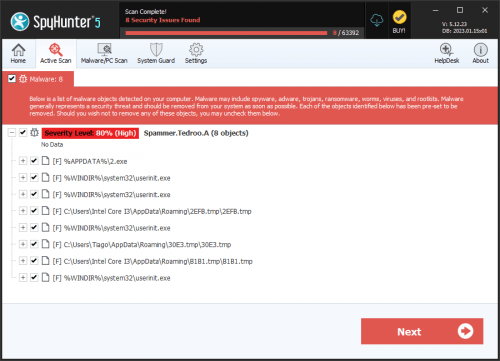
Spammer.Talwadig.A
Threat Scorecard
EnigmaSoft Threat Scorecard
EnigmaSoft Threat Scorecards are assessment reports for different malware threats which have been collected and analyzed by our research team. EnigmaSoft Threat Scorecards evaluate and rank threats using several metrics including real-world and potential risk factors, trends, frequency, prevalence, and persistence. EnigmaSoft Threat Scorecards are updated regularly based on our research data and metrics and are useful for a wide range of computer users, from end users seeking solutions to remove malware from their systems to security experts analyzing threats.
EnigmaSoft Threat Scorecards display a variety of useful information, including:
Popularity Rank: The ranking of a particular threat in EnigmaSoft’s Threat Database.
Severity Level: The determined severity level of an object, represented numerically, based on our risk modeling process and research, as explained in our Threat Assessment Criteria.
Infected Computers: The number of confirmed and suspected cases of a particular threat detected on infected computers as reported by SpyHunter.
See also Threat Assessment Criteria.
| Threat Level: | 80 % (High) |
| Infected Computers: | 1 |
| First Seen: | June 17, 2011 |
| OS(es) Affected: | Windows |
The detection of Spammer.Talwadig.A on your system indicates a potential threat to your computer's security and integrity. This Trojan-type threat can compromise your system's performance, steal sensitive information, and disrupt your online activities. It is essential to understand the nature of this threat and take immediate action to remove it from your system.
Table of Contents
What Is Spammer.Talwadig.A?
Spammer.Talwadig.A is a type of malicious software that can infect your computer without your knowledge or consent. Its primary purpose is to disrupt your system's normal functioning, often by sending unsolicited emails or messages, hence the name "Spammer." The exact mechanisms and behaviors of Spammer.Talwadig.A can vary, but its ultimate goal is to exploit your system for malicious purposes.
How Spammer.Talwadig.A Operates
Spammer.Talwadig.A operates by infiltrating your system, often through vulnerabilities in software or by disguising itself as a legitimate program. Once inside, it can create backdoors, modify system settings, and communicate with its command and control servers to receive further instructions. This threat can also spread to other systems, either through network connections or by infecting removable media.
Symptoms of Infection
Identifying the symptoms of a Spammer.Talwadig.A infection can be challenging, as they may resemble issues caused by other malware or system problems. Common indicators include unusual system behavior, such as slow performance, frequent crashes, or unexpected pop-ups. You might also notice an increase in spam emails or messages being sent from your accounts without your consent. Additionally, your system may become more vulnerable to other types of malware and cyber threats.
- Unexplained changes in system settings or configuration
- Appearance of unfamiliar programs or icons
- Increased network activity or data usage
- Receipt of warnings or alerts from your security software
How to Remove Spammer.Talwadig.A
- Boot your computer in Safe Mode with Networking to prevent the malware from loading and to allow for internet access for updates and downloads.
- Use a reputable anti-malware tool, such as SpyHunter, to perform a full scan of your system. Ensure the tool is updated with the latest definitions to improve detection and removal capabilities.
- Uninstall any suspicious programs or applications that you do not recognize or that were installed around the time the issue started. Be cautious and only remove programs you are certain are malicious or unnecessary.
- Reset your web browsers (Chrome, Firefox, Edge) to their default settings to remove any malicious extensions or settings that the malware might have altered.
- Reboot your computer and perform another full scan with your anti-malware tool to ensure that all components of the malware have been removed. Repeat this process until no more threats are detected.
Conclusion
Removing Spammer.Talwadig.A from your system requires careful and thorough action. By following the steps outlined above and maintaining vigilance in your online activities, you can protect your system from this and other types of malware. Regularly updating your security software, being cautious with email attachments and links, and avoiding suspicious downloads are crucial steps in preventing future infections. Remember, staying informed and proactive is key to safeguarding your digital environment.
Aliases
15 security vendors flagged this file as malicious.
| Antivirus Vendor | Detection |
|---|---|
| Panda | W32/LdPinch.AVK.worm |
| AVG | Generic9.AJJJ |
| Fortinet | W32/Agent.BX!worm |
| Ikarus | Trojan-Dropper.Agent |
| AhnLab-V3 | Win32/Agent.worm.62464 |
| Microsoft | Spammer:Win32/Talwadig.A |
| eTrust-Vet | Win32/Cutwail.PZ |
| Sophos | Mal/Basine-C |
| AntiVir | TR/Drop.RKit.EY |
| Comodo | TrojWare.Win32.Wigon.AI |
| BitDefender | Trojan.Inject.IA |
| Kaspersky | Email-Worm.Win32.Agent.bx |
| Avast | Win32:Agent-NGJ |
| Symantec | Trojan.Pandex |
| NOD32 | Win32/Wigon.AI |
File System Details
| # | File Name | MD5 |
Detections
Detections: The number of confirmed and suspected cases of a particular threat detected on
infected computers as reported by SpyHunter.
|
|---|---|---|---|
| 1. | service.exe | 4f7e30f61e01bc0bbba5ffdf35281b95 | 1 |