PUP.UCheck
Threat Scorecard
EnigmaSoft Threat Scorecard
EnigmaSoft Threat Scorecards are assessment reports for different malware threats which have been collected and analyzed by our research team. EnigmaSoft Threat Scorecards evaluate and rank threats using several metrics including real-world and potential risk factors, trends, frequency, prevalence, and persistence. EnigmaSoft Threat Scorecards are updated regularly based on our research data and metrics and are useful for a wide range of computer users, from end users seeking solutions to remove malware from their systems to security experts analyzing threats.
EnigmaSoft Threat Scorecards display a variety of useful information, including:
Popularity Rank: The ranking of a particular threat in EnigmaSoft’s Threat Database.
Severity Level: The determined severity level of an object, represented numerically, based on our risk modeling process and research, as explained in our Threat Assessment Criteria.
Infected Computers: The number of confirmed and suspected cases of a particular threat detected on infected computers as reported by SpyHunter.
See also Threat Assessment Criteria.
| Popularity Rank: | 3,376 |
| Threat Level: | 10 % (Normal) |
| Infected Computers: | 130 |
| First Seen: | September 12, 2026 |
| Last Seen: | October 25, 2026 |
| OS(es) Affected: | Windows |
PUP.UCheck is the detection name used for UCheck, a Windows application that has been flagged as a Possibly Unwanted Program (PUP). While it is not classified as a high-risk threat, UCheck has drawn scrutiny from independent app-review organizations for engaging in deceptive practices. In particular, UCheck has been designated a "Deceptor" by AppEsteem, an organization whose mission is to establish clear rules for software behavior and review applications against those standards. According to AppEsteem, UCheck has violated one or more of its Deceptor-level requirements, meaning the program may mislead or inconvenience users in ways that fall short of acceptable software conduct.
Table of Contents
What PUP.UCheck Does
UCheck presents itself as a utility, often marketed around functions like software or driver updating. However, programs that earn a Deceptor designation typically engage in behaviors such as exaggerating the number or severity of problems found on a system, pushing users toward paid upgrades through alarming or misleading messages, installing without clear and informed consent, or making it difficult for users to uninstall the program once it is on their machine. Deceptor-labeled apps are also commonly associated with bundling tactics, where the software is installed alongside other programs without the user fully realizing what they are agreeing to. While specific behavioral details for UCheck beyond its Deceptor classification are not confirmed, this is the general pattern associated with software in this category.
How PUP.UCheck Gets Onto Computers
Possibly unwanted programs like UCheck typically spread through software bundling, where the program is included as an additional offer during the installation of other free or trial software. Users who click through installation wizards quickly, without reviewing each screen, may inadvertently agree to install UCheck alongside the program they actually wanted. It can also be downloaded directly if a user searches for system utility or driver-checking tools and selects a result promoting this software, such as a file named UCheck_setup_win10.exe.
Risks for the User
Although PUP.UCheck carries a low danger rating, it can still create real inconveniences. Users may experience unwanted pop-ups, persistent prompts urging them to purchase a premium version, or exaggerated system warnings designed to create a false sense of urgency. These tactics can lead users to spend money on unnecessary upgrades or to feel pressured into decisions they would not otherwise make. The presence of such software can also slow down system performance and clutter the user experience with notifications unrelated to any genuine issue.
Signs of Infection
Common indicators that UCheck may be present on a system include the appearance of UCheck.exe running in the background or in the list of installed programs, unexpected pop-up windows referencing software or driver updates, and frequent prompts encouraging the purchase of a full or premium version. Users who do not recall intentionally installing such a tool, but find it listed among their programs, should treat this as a sign worth investigating further.
How to Stay Protected
To avoid PUP.UCheck and similar programs, users should download software only from official sources and avoid third-party download sites that bundle extra offers. During any installation, it is important to choose custom or advanced setup options rather than default settings, since this allows users to see and deselect any additional software being offered. Keeping a reputable security solution active and regularly reviewing the list of installed programs can also help identify and remove unwanted software before it causes further inconvenience.
SpyHunter Detects & Remove PUP.UCheck
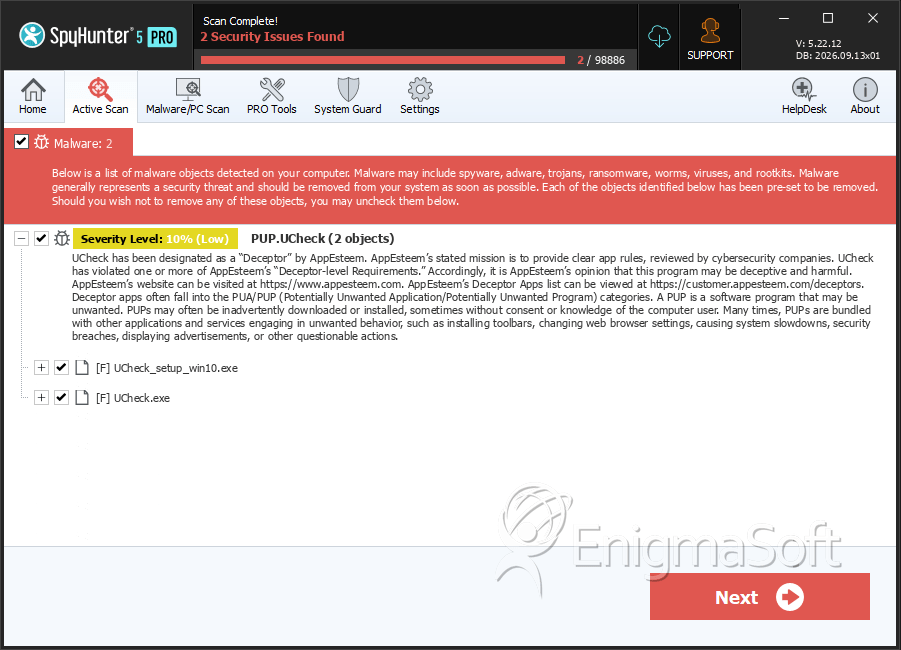
File System Details
| # | File Name | MD5 |
Detections
Detections: The number of confirmed and suspected cases of a particular threat detected on
infected computers as reported by SpyHunter.
|
|---|---|---|---|
| 1. | UCheck_setup_win10.exe | ef9a4c631ef824c2ab00612b270f8bea | 43 |
| 2. | UCheck.exe | a4c68ad5d1508093f38cdd1abdfb7e5b | 43 |


