Adware:Win32/Lollipop
Threat Scorecard
EnigmaSoft Threat Scorecard
EnigmaSoft Threat Scorecards are assessment reports for different malware threats which have been collected and analyzed by our research team. EnigmaSoft Threat Scorecards evaluate and rank threats using several metrics including real-world and potential risk factors, trends, frequency, prevalence, and persistence. EnigmaSoft Threat Scorecards are updated regularly based on our research data and metrics and are useful for a wide range of computer users, from end users seeking solutions to remove malware from their systems to security experts analyzing threats.
EnigmaSoft Threat Scorecards display a variety of useful information, including:
Popularity Rank: The ranking of a particular threat in EnigmaSoft’s Threat Database.
Severity Level: The determined severity level of an object, represented numerically, based on our risk modeling process and research, as explained in our Threat Assessment Criteria.
Infected Computers: The number of confirmed and suspected cases of a particular threat detected on infected computers as reported by SpyHunter.
See also Threat Assessment Criteria.
| Popularity Rank: | 2,370 |
| Threat Level: | 20 % (Normal) |
| Infected Computers: | 36,421 |
| First Seen: | July 26, 2013 |
| Last Seen: | April 22, 2026 |
| OS(es) Affected: | Windows |
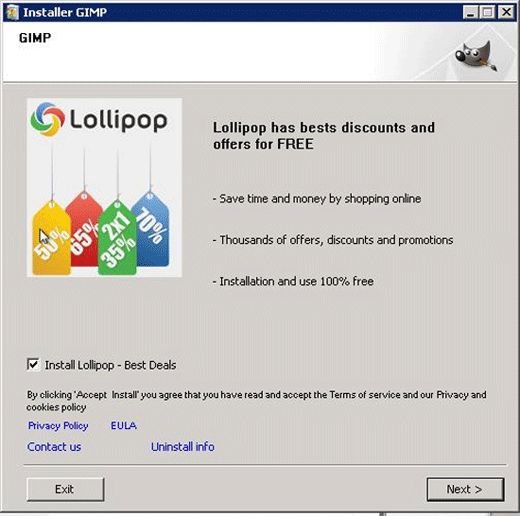
Adware:Win32/Lollipop Image
Adware:Win32/Lollipop is often installed by a third party bundler. Some examples of threats designed to install Adware:Win32/Lollipop include SoftwareBundler:Win32/Lollipox and SoftwareBundler:Win32/Lollipos. It is important to note that it is usually possible to opt out of installing the Adware:Win32/Lollipop, meaning that being careful when installing new software is essential in order to avoid these kinds of threats. There are numerous installers bundled with popular freeware programs that are designed to install Adware:Win32/Lollipop and similar threats.
Table of Contents
The Adware:Win32/Lollipop Uses Three Different Attack Methods
Initially, Adware:Win32/Lollipop will drop its executable file on the victim's computer. Adware:Win32/Lollipop then creates various files, which are dropped on various local folders. Every time the victim's operating system starts up, the Adware:Win32/Lollipop executable file will start up automatically. One of the interesting aspects of Adware:Win32/Lollipop is that Adware:Win32/Lollipop will modify its approach depending on the victim's operating system and security software. Adware:Win32/Lollipop will typically use one of the following three methods to attack a computer:
- Adware:Win32/Lollipop makes changes to the infected computer's registry, which allow Adware:Win32/Lollipop to start up automatically along with the operating system.
- Adware:Win32/Lollipop may create a new Registry entry that ensures that Adware:Win32/Lollipop runs automatically.
- Adware:Win32/Lollipop may also create a shortcut to its executable located in the Start-up folder, causing Adware:Win32/Lollipop to start up in the same manner as other programs designed to start up automatically upon start-up.
Adware:Win32/Lollipop is designed to force computer users to view online advertisements. An icon and pop-up windows may also appear on the victim's computer and Desktop without warning.
It is important to first uninstall Adware:Win32/Lollipop through normal means in order to ensure that all traces of this threat are gone from the targeted computer. Once Adware:Win32/Lollipop has been uninstalled, it is then necessary to use a reliable anti-malware program to scan the infected computer. This is due to the fact that pop-up advertisements and redirects associated with Adware:Win32/Lollipop may expose your Web browser to websites containing malicious content or promoting known online scams. It is usually then necessary to undo manually various changes that may have been made to your computer's and Web browser's settings.
SpyHunter Detects & Remove Adware:Win32/Lollipop
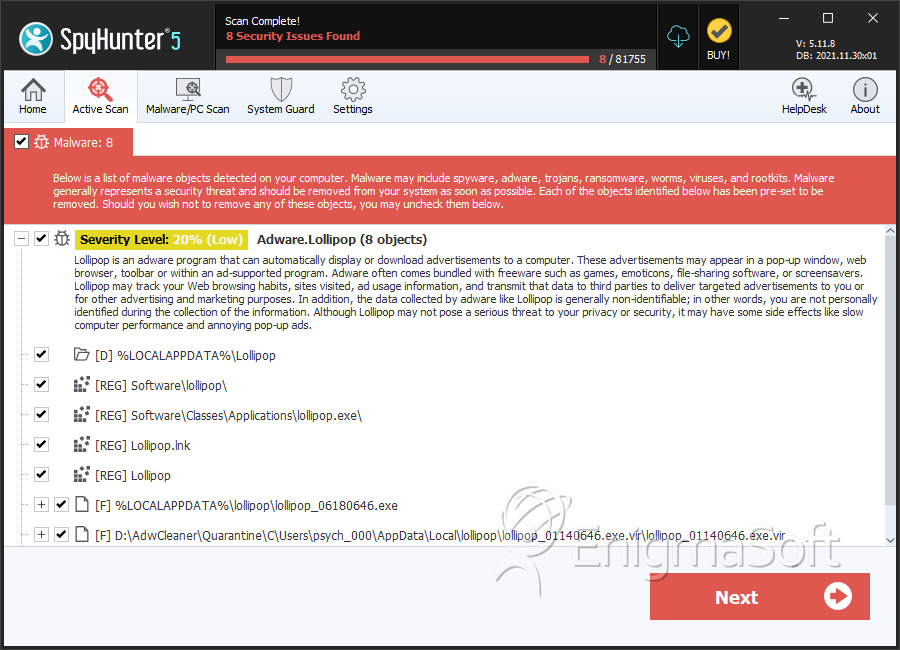
File System Details
| # | File Name | MD5 |
Detections
Detections: The number of confirmed and suspected cases of a particular threat detected on
infected computers as reported by SpyHunter.
|
|---|---|---|---|
| 1. | lollipop_06180646.exe | 3cc350fee58457d0365182fb8c59bb6a | 339 |
| 2. | lollipop_01140646.exe.vir | 2d5adcc03cbadf0c6b39b28db3b9e789 | 324 |
| 3. | lollipop_08270806.exe | 887fcbf88d022dacb2365706f1031a4f | 183 |
| 4. | lollipop_03301529.exe | 1516bdc7a7e693b49a01bfdba91e01d3 | 90 |
| 5. | lollipop_01281129.exe | 64877235d98c71d8c48e1db8c31ed658 | 81 |
| 6. | lollipop_04181622.exe | 244dd30974fc4f829a13b8d1fac89ad3 | 80 |
| 7. | lollipop_01230933.exe | 7d85fdea6827d949a7cc1344a80fe50c | 71 |
| 8. | lollipop_08011702.exe | d2c44af75b99eed953c39a91511495c9 | 62 |
| 9. | lollipop_11262227.exe | 4a1351be9180f12b9139b73a3ca06933 | 48 |
| 10. | lollipop_04292001.exe | efc8f8a5c58d6d85cd186460b193b0fd | 47 |
| 11. | lollipop_08261228.exe | cefffd9757d00f8414f5a596995b1b67 | 46 |
| 12. | lollipop_06300447.exe | b181b9893f5bf892271fcc079b4a97b1 | 44 |
| 13. | lollipop_08311631.exe | 30c5be6d778a2940c826ab1c21772a39 | 36 |
| 14. | lollipop_01212121.exe | 932dec28a2c211e454f7a6414cc45cd1 | 36 |
| 15. | lollipop_05062010.exe | 0af7c5be58a67ac3d098ce137fa43c73 | 35 |
| 16. | 723c2264d7ebe25354f2b1ba124e42b07ba14c30ca5d38fae27b76020f974bae | 4346196036df6d4bb56d6f95114ef1a4 | 34 |
| 17. | lollipop_05070321.exe | 22fe4679790b3a9b0f64c2bba32c3207 | 33 |
| 18. | lollipop_06171900.exe | 691aee51a10e376dc654dae899ae3d49 | 33 |
| 19. | lollipop_06201810.exe | 6929b17f5e325ea34bbe2ee667b06a3f | 32 |
| 20. | lollipop_06080952.exe | a8c828fcb0d30fa095c7005975485815 | 31 |
| 21. | Lollipop.exe.vir | d567904e69aa149adf8968374d68c222 | 31 |
| 22. | lollipop_03121320.exe | 30b4343424ba93fed75f9f9b2195d0b4 | 31 |
| 23. | lollipop_07032150.exe | 4d2664bfba8f7b7a2a30d6518d62d1e4 | 27 |
| 24. | lollipop.exe | a8c1bf27edb90bf21875f6bdbfa4f526 | 27 |
| 25. | lollipop_06170935.exe | 00281f1dbedb7bee0878e47db7a33929 | 25 |
| 26. | lollipop_04231403.exe | a4f65a4be87844d554d2af2eec8a1635 | 25 |
| 27. | lollipop_03261342.exe | 6e092fe93f0cf96b36a0f975c135abb7 | 24 |
| 28. | lollipop_08310817.exe | d83d4556432493b9ce154cdb8477b675 | 23 |
| 29. | %LOCALAPPDATA%\Lollipop\lollipop.bat | ||
| 30. | %LOCALAPPDATA%\Lollipop\logo.ico | ||
| 31. | %LOCALAPPDATA%\Lollipop\Lollipop.lpd | ||
| 32. | %LOCALAPPDATA%\Lollipop\Lollipop_ps.lpd | ||
| 33. | LollipopInstaller.exe | 78931038c829f9c9ab11af8447a72bd9 | 0 |
Registry Details
Directories
Adware:Win32/Lollipop may create the following directory or directories:
| %APPDATA%\lollipop |
| %LOCALAPPDATA%\Lollipop |
| %UserProfile%\Local Settings\Application Data\Lollipop |
| %WINDIR%\system32\config\systemprofile\appdata\local\lollipop |
| %WINDIR%\syswow64\config\systemprofile\appdata\local\lollipop |



