Are You Sure You’re NOT Infected with Malware?
Don’t Fall Victim to Malware or Ransomware Attacks!
Detect and remove malware, viruses, ransomware & other threats for FREE! Get Protected with SpyHunter.
Download SpyHunterWhat is a cookie?
An HTTP cookie is a small piece of text data that is stored on a personal computer or a mobile device by the web browser. This small piece of data is there to help the browser remember information about the user.
The easiest way to understand what a cookie does is by thinking about online shopping. For instance, a user can add various items to their shopping cart, then close the tab or hop to another online store to compare prices or to look at other products. When or if they go back to the page that they were on, the shopping cart items should still be there. How does the cart remember all those items? The cookies help the browser maintain that information. Thus, in a sense, cookies are essential for online marketing, and they are integral parts of any website. Some web pages cannot even function properly without cookies.
There are several types of cookies. Authentication cookies allow websites to authenticate users. For instance, if a user logs in to some website and their browser saves an authentication cookie, then the next time the user opens the website, they will be already logged in (unless they have other security settings turned on).
Then there are session cookies that function like certain browser bookmarks. The example with the online shopping cart is a staple use of a session cookie. The important thing about session cookies is that they get deleted once a browsing session ends. In other words, the moment user closes their browser, the session cookies disappear.
And finally, we have tracking (or preference) cookies. Tracking cookies are used to collect and store information on a user’s web browsing habits and history. They can be used as a marketing tool by commercial websites to optimize user’s experience and offer them goods and services that users might be more inclined to choose.
What does a tracking cookie do?
As mentioned, tracking cookies collects information on browsing history. Tracking cookies can be used by several websites, especially when they are third-party tracking cookies. They can track IP addresses, browsing activity, purchases and preferences (in the case of online stores), user’s geographic location, and so on. All of that is usually done in order to achieve the following:
Therefore, in a sense, tracking cookies are there to provide a seamless custom experience and to optimize a website for its owner. It is safe to assume that almost any website has its own tracking cookies, and it is also common to employ third-party tracking cookies.
The difference between third-party and first-party tracking cookies is that they “look” at different websites for references. A first-party tracking cookie will look for references only within its main domain and its subdomains. A third-party tracking cookie will look for references across multiple domains, wherever it is used. So, for example, if the same third-party cookie is used across multiple domains, anyone who reads this cookie could find out what the user has searched for on a third-party (affiliated) website even if this said user has never visited their main site directly.
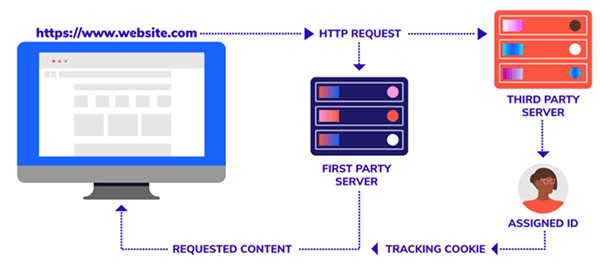
First-Party vs. Third-Party Cookies – Source: searchengineland.com
There are countless tracking cookies in the wild, and it would be counterproductive to list them all in this description, but some of the examples include as follow:
Why are tracking cookies a security risk?
Tracking cookies by themselves are dangerous or malicious. As mentioned, they are an integral part of many websites out there. They can also optimize web pages for seamless user experience, but third-party tracking cookies may present certain security risks depending on how they are used.
The main security concern associated with tracking cookies is privacy. If shared information about a user’s browsing habits is shared among several parties, users could eventually be exposed to potentially harmful websites and unreliable content. It is especially relevant when users accidentally install browser hijackers, adware, and potentially unwanted programs. These types of potentially risky software go hand in hand with third-party tracking cookies.
Due to such risks, it is common to ask for informed user’s consent via “cookie banners” before cookies are launched on a website. In the European Union, the General Data Protection Regulation (GDPR), which was enacted in 2018, requires consent for cookies, and users must be informed about anything that could collect their information and web browsing history.
In the United States, there is no all-encompassing federal regulation that would require consent for cookies. Nevertheless, there are strong privacy laws in California, where the California Consumer Privacy Act (CCPA), signed into law in 2018, provides California residents with the right to know what data is collected about them, among other things. The state statute, however, does not require explicit consent for cookies.
Therefore, it is often up to users to educate themselves about tracking cookies. Luckily, it is rather easy to delete cookies and the data they have collected from individual browsers. The “delete cookies” option can be found in the settings menu across different browsers. Also, if users do not wish to regularly delete cookies manually, they can rely on an anti-malware tool that can clear cookies for them automatically.
| # | Threat Name |
Severity Level
Severity Level: The determined severity level of an object, represented
numerically, based on our risk modeling process and research, as explained in our
Threat Assessment Criteria.
|
Alias(es) |
Detections
Detections: The number of confirmed and suspected cases of a particular threat detected on
infected computers as reported by SpyHunter.
|
|---|---|---|---|---|
| 1. | 8thstreetlatinas | 10 % (Normal) | 865 | |
| 2. | HornyWifePhotos | 10 % (Normal) | 199 | |
| 3. | 100hot | 10 % (Normal) | 923 | |
| 4. | MomsTrySons | 10 % (Normal) | 1,611 | |
| 5. | Zlob.CodecHQ.Cookie | 10 % (Normal) | 29 | |
| 6. | PayCounter | 10 % (Normal) | 159 | |
| 7. | TabooArchive | 10 % (Normal) | 404 | |
| 8. | EPilot | 10 % (Normal) | 197,213 | |
| 9. | AdultComix | 10 % (Normal) | 20,319 | |
| 10. | DailyKnockers | 10 % (Normal) | 14 | |
| 11. | WildXXXParties | 10 % (Normal) | 2,925 | |
| 12. | LesbianMilfs | 10 % (Normal) | 83 | |
| 13. | Free-Porn | 10 % (Normal) | 17,237 | |
| 14. | MyTeens | 10 % (Normal) | 11,227 | |
| 15. | SoftcoreTeenies | 10 % (Normal) | 123 | |
| 16. | SexSearch | 10 % (Normal) | 5,505 | |
| 17. | Zlob.Totalcodec.Cookie | 10 % (Normal) | 10 | |
| 18. | Dads-Daughters | 10 % (Normal) | 105 | |
| 19. | AragornsFeetLinks | 10 % (Normal) | 9 | |
| 20. | BoypornMechanics | 10 % (Normal) | 3 | |
| 21. | VoyeurPorn | 10 % (Normal) | 4,869 | |
| 22. | GayFreeVideos | 10 % (Normal) | 72 | |
| 23. | AdultMovieDir | 10 % (Normal) | 62 | |
| 24. | Searchportal | 10 % (Normal) | 1,634 | |
| 25. | AdForce | 10 % (Normal) | 12,786 | |
| 26. | Adult Revenue Service | 10 % (Normal) | 1 | |
| 27. | Adrevolver | 10 % (Normal) | 1,009 | |
| 28. | Qsrch | 10 % (Normal) | 120 | |
| 29. | EroMyPorn | 10 % (Normal) | 174 | |
| 30. | VIPXXXVideo | 10 % (Normal) | 3 |
| Threat Name |
Severity Level
Severity Level: The determined severity level of an object, represented
numerically, based on our risk modeling process and research, as explained in our
Threat Assessment Criteria.
|
Detections
Detections: The number of confirmed and suspected cases of a particular threat detected on
infected computers as reported by SpyHunter.
|
|---|---|---|
| 100hot | 10 % (Normal) | 923 |
| 247Media | 10 % (Normal) | 10,207 |
| 360i | 10 % (Normal) | 4 |
| 8thstreetlatinas | 10 % (Normal) | 865 |
| AboutPorno | 10 % (Normal) | 1,027 |
| AcervoGay | 10 % (Normal) | 33 |
| ad-flow | 10 % (Normal) | 49 |
| adbrite | 10 % (Normal) | 32,454 |
| AdBureau | 10 % (Normal) | 3,687 |
| AdDynamix | 10 % (Normal) | 525 |
| AdECN | 10 % (Normal) | 3,433 |
| AdForce | 10 % (Normal) | 12,786 |
| AdMonitor | 10 % (Normal) | 6,936 |
| Adrevolver | 10 % (Normal) | 1,009 |
| Ads360 | 10 % (Normal) | 11,740 |
| adserver | 10 % (Normal) | 4 |
| Adult Revenue Service | 10 % (Normal) | 1 |
| Adult-Clips | 10 % (Normal) | 806 |
| Adult-Empire | 10 % (Normal) | 31,764 |
| AdultAdWorld | 10 % (Normal) | 16,053 |
| AdultBouncer | 10 % (Normal) | 122 |
| AdultComix | 10 % (Normal) | 20,319 |
| AdultMovieClub | 10 % (Normal) | 112 |
| AdultMovieDir | 10 % (Normal) | 62 |
| AdultPornTube | 10 % (Normal) | 163 |